Registration Process
Quickly complete registration to start your automated lending journey
Create Account
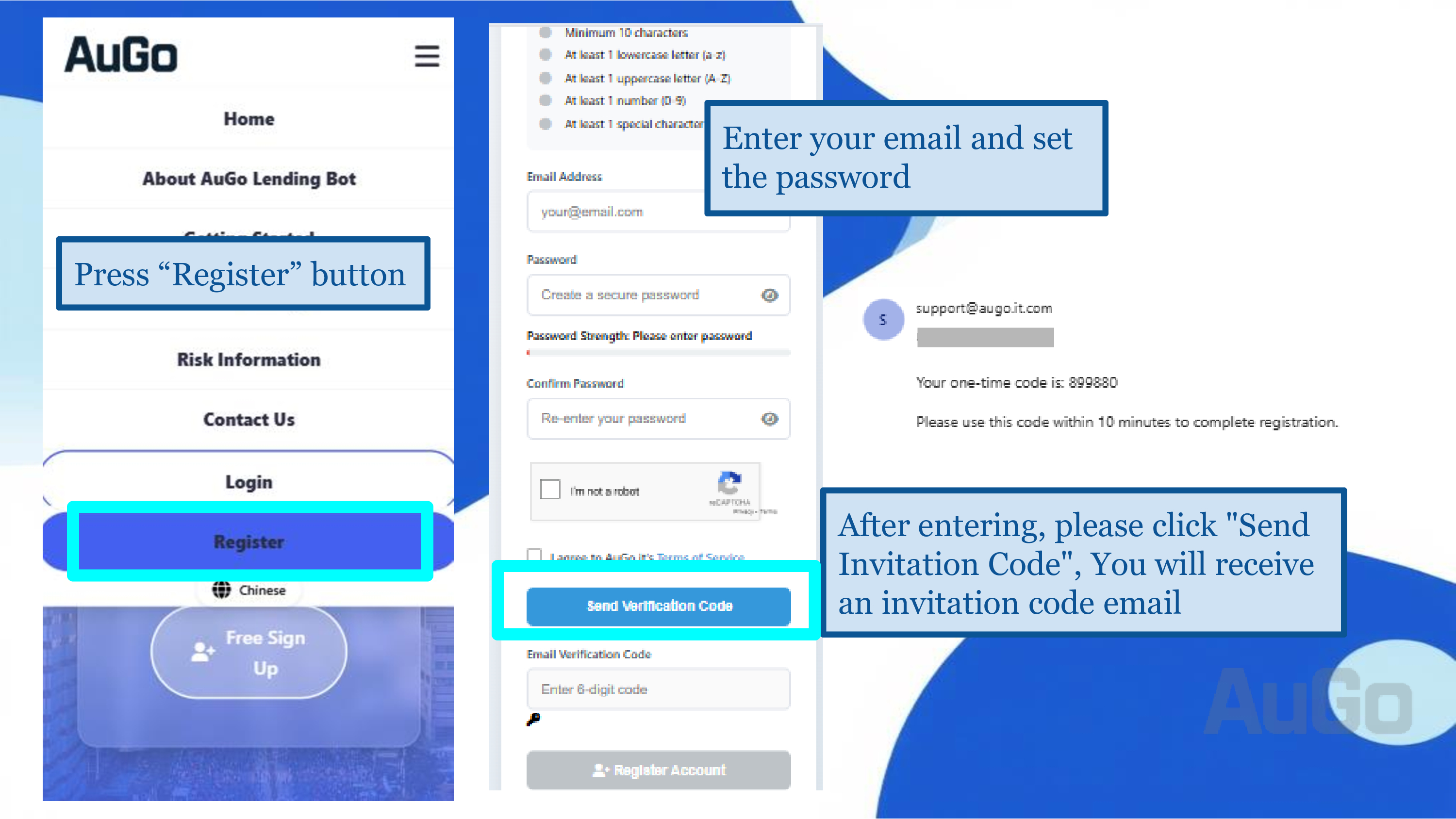
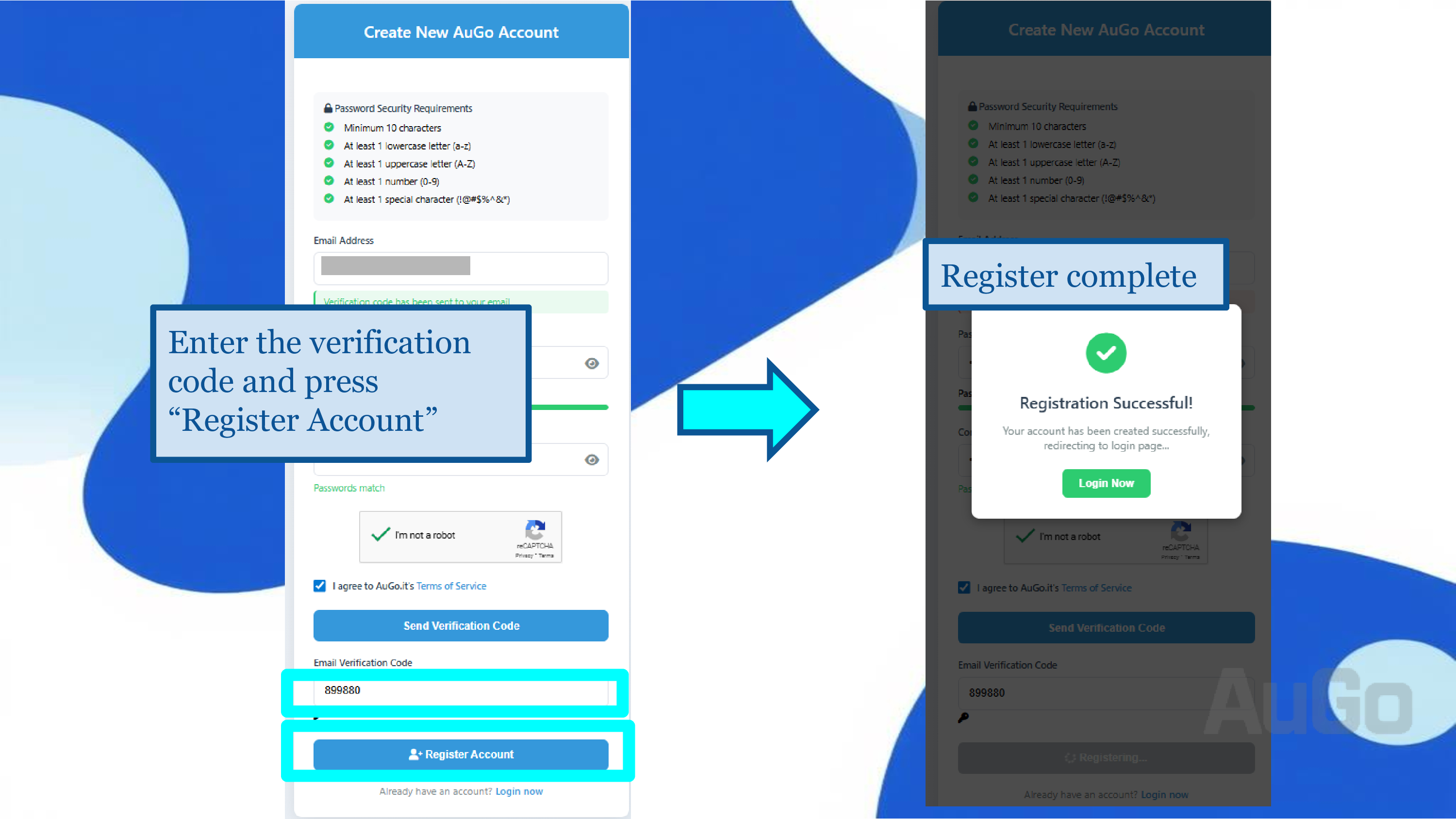
Fill in basic information, including email and password. Check your email and enter the verification code to complete registration.
Log In
Log in to the AuGo platform using your credentials.
Subscribe to a Plan
Subscribe to a plan based on your funds and preferences.
Configure the Bot
Select the bot you need, enter your Bitfinex API, and complete the relevant settings.
1Detailed Registration Steps
1. Click the "Register" button in the top right corner.
2. Fill in the necessary registration information:
- Email Address
- A secure password (at least 8 characters, including uppercase and lowercase letters, numbers, and symbols)
- Complete the CAPTCHA verification
3. Read and agree to the Terms of Service and Privacy Policy.
5. Click to send the verification code.
Please use a real and valid email address to receive verification emails and important notifications.
2Email Verification
1. After registering, the system will send a verification email to your registered email address.
2. Open the email and copy the provided verification code.
3. Return to the registration website, paste the email verification code, and click "Register Account".
If you do not receive the verification email, please check your spam folder, or wait and click "Resend Verification Email".
3Log In to the System
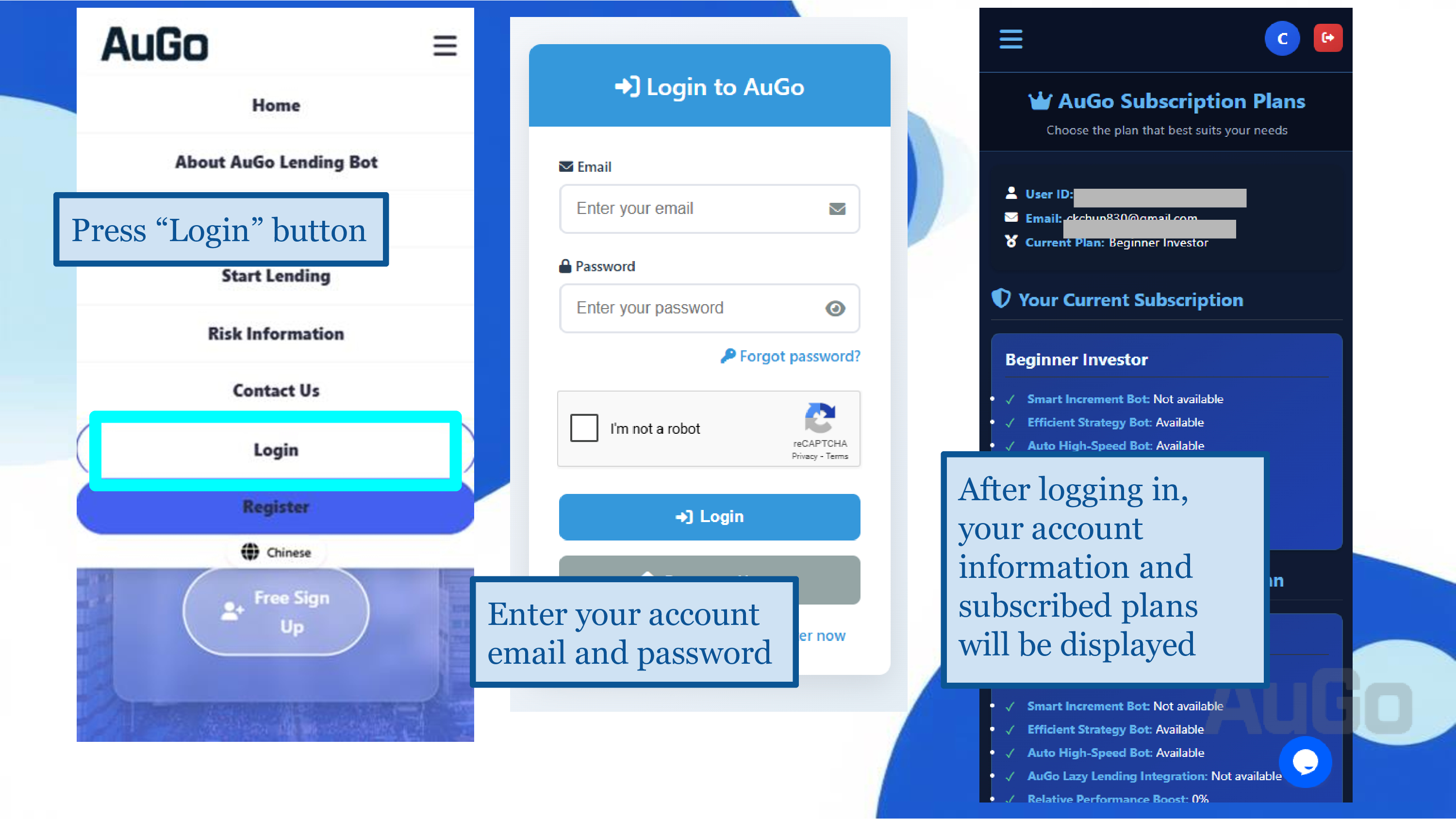
1. Click the "Login" button in the top right corner.
2. Enter your registered email and password.
3. Complete the CAPTCHA verification.
4. Click the "Login" button to enter the dashboard.
Subscription Plans
Choose the plan that best suits your needs, or create a custom plan. New users enjoy a 10-day full-featured free trial with a cap of $50,000 USD equivalent.
"Starter Investor"
85 USDT/year, suitable for new professionals and beginner investors.
- Efficient Strategy Bot
- Auto High-Speed Bot
- Minimum Refresh Interval: 15 minutes
- Bot Limit: 1
- Lending Cap: $10,000 USD equivalent
"Savvy Investor"
190 USDT/year, an advanced plan tailored for savvy investors.
- Efficient Strategy Bot
- High Yield Increment Bot
- Auto High-Speed Bot
- Minimum Refresh Interval: 12 minutes
- Bot Limit: 2
- Lending Cap: $50,000 USD equivalent
"Financial Capitalist"
380 USDT/year, for advanced investors with ample capital seeking maximum efficiency.
- Efficient Strategy Bot
- High Yield Increment Bot
- Auto High-Speed Bot
- Minimum Refresh Interval: 10 minutes
- Bot Limit: 4
- Lending Cap: $200,000 USD equivalent
How to Choose a Subscription Plan
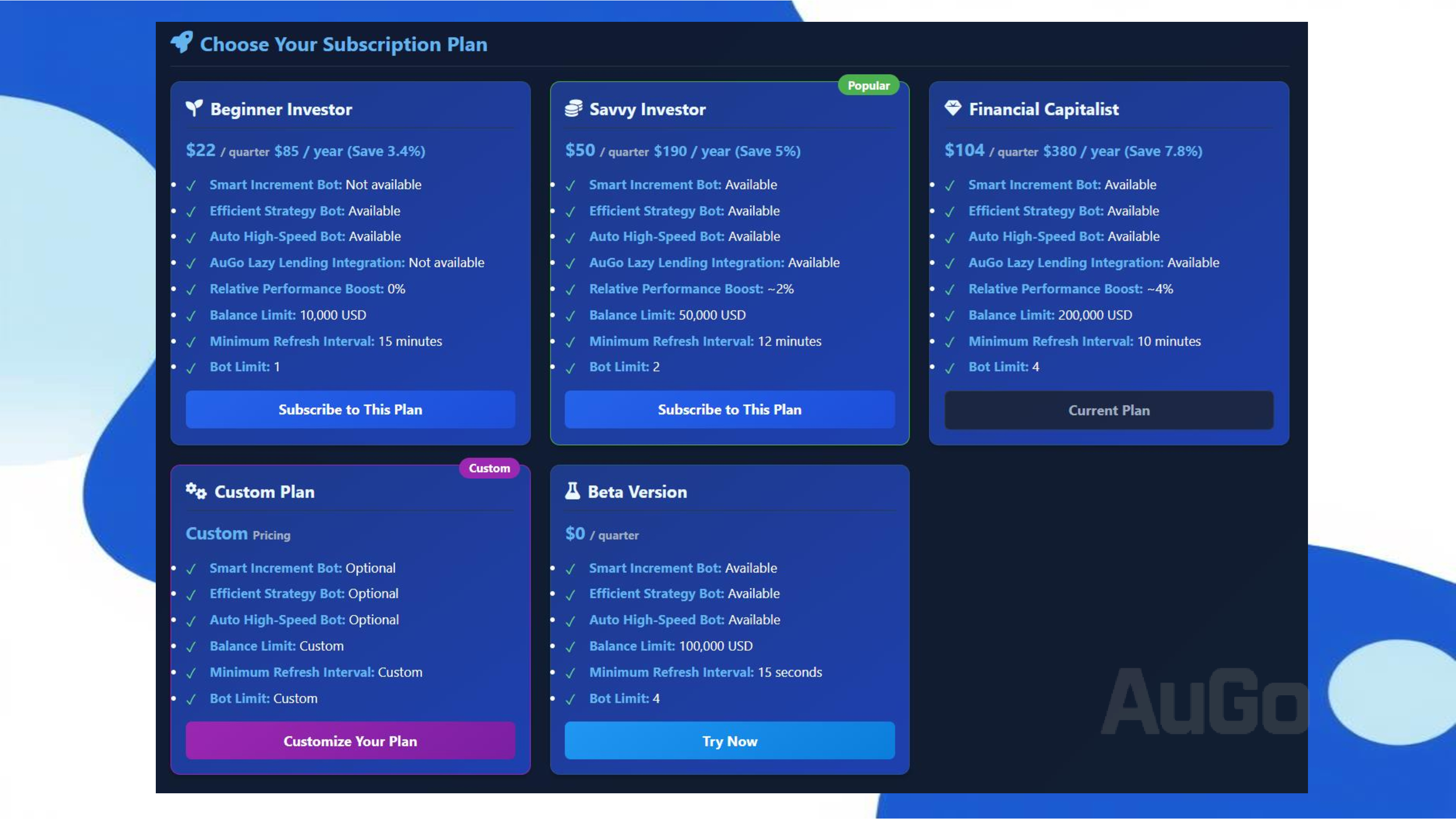
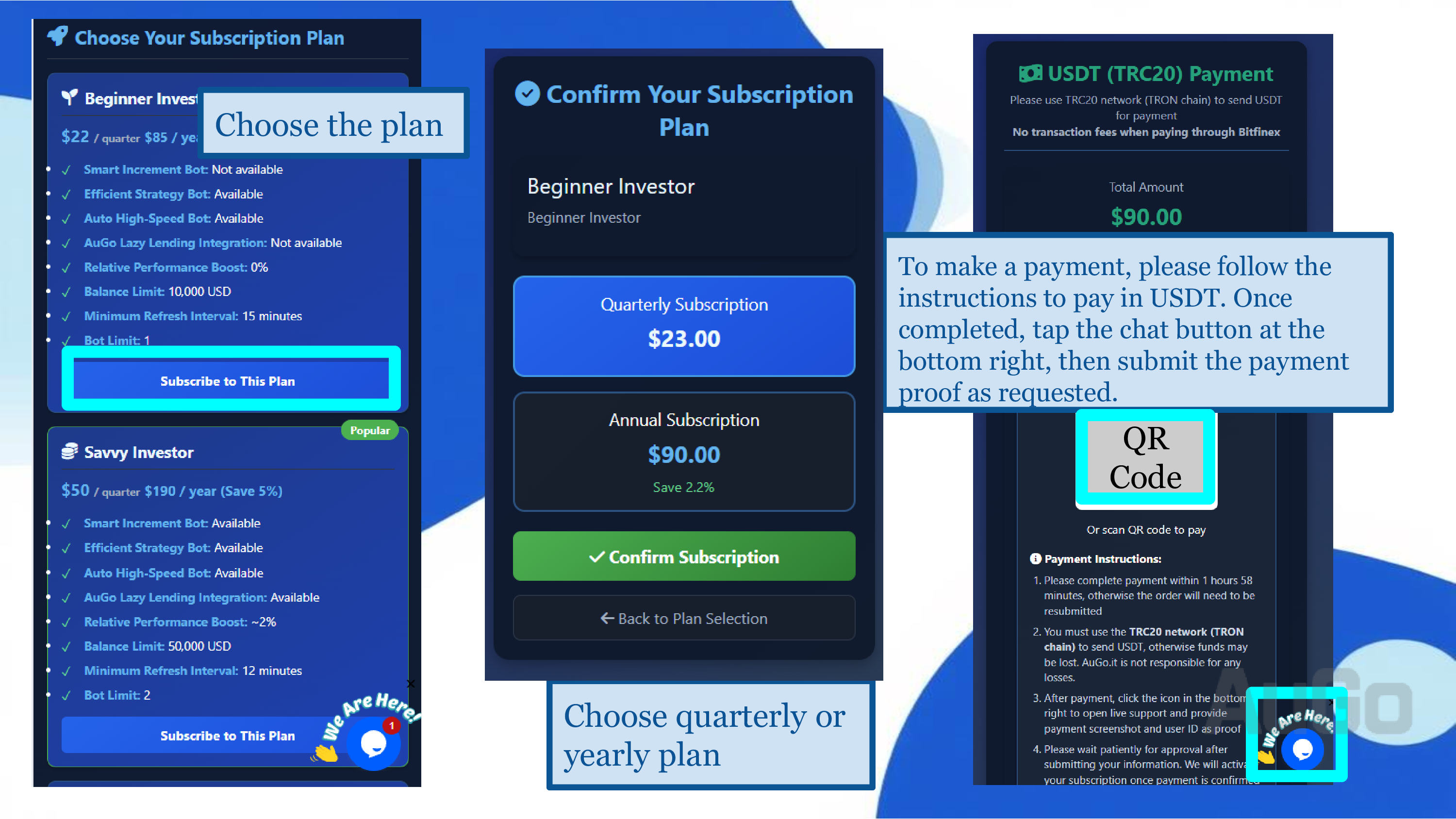
1. After logging in, go to the subscription page.
2. Review the detailed features and prices of each plan.
3. Click the "Choose This Plan" button or, on the custom plan page, select your options and click "Confirm Subscription".
4. Proceed to the payment page, carefully review the purchase details, and transfer USDT to the receiving address.
5. Please wait patiently for payment confirmation, which can take from a few seconds to several minutes. If you have any questions, please contact [email protected].
6. Refresh the main page to confirm your subscription.
You can upgrade your subscription plan at any time from the main dashboard.
Bot Types
Understand the different lending strategies we offer
Efficient Strategy Bot
Uses the AuGo algorithm to find the best current rate and loan duration, balancing speed, rate, and liquidity.
- Suitable for beginners; can be combined with FRR for higher expected returns.
- Rates are tied to current market conditions.
- Automatically adjusts rates to maintain competitive offers.
High Yield Increment Bot
Uses the AuGo algorithm to find higher rates and longer durations, then allocates funds using an incremental index or rate.
- Ideal for investors seeking high rates with sufficient capital.
- Recommended to be used with the Efficient Strategy Bot for balanced returns.
- Can use an inverted pyramid model to allocate funds, gaining an advantage when rates rise.
Auto High-Speed Bot
For investors who want to lend out funds for short terms at the highest available rate on the order book.
- Fastest offer placement, lending out all funds in a short period.
- Can reserve some liquidity for laddered high-rate offers or FRR offers.
AuGo Lazy Man Integrated Lending
Feeling complicated setting up bots? Try AuGo Lazy Man Integrated Lending
- Achieves balance in capital utilization, interest rates, and liquidity without thinking about how to set bot amounts and configurations
- It combines strategy and ladder bots and adjusts proportional parameters based on your capital
- Just provide basic settings and you're ready to go
- Most importantly, it requires no extra fee as long as your plan includes both strategy and ladder bots and the bot limit is 2 or more, it unlocks automatically.
AuGo Fund Data & Statistics
Track your fund status, interest earnings, and capital amount
1View Interest Records
1. Log in to your AuGo account.
2. Navigate to the "Dashboard" page.
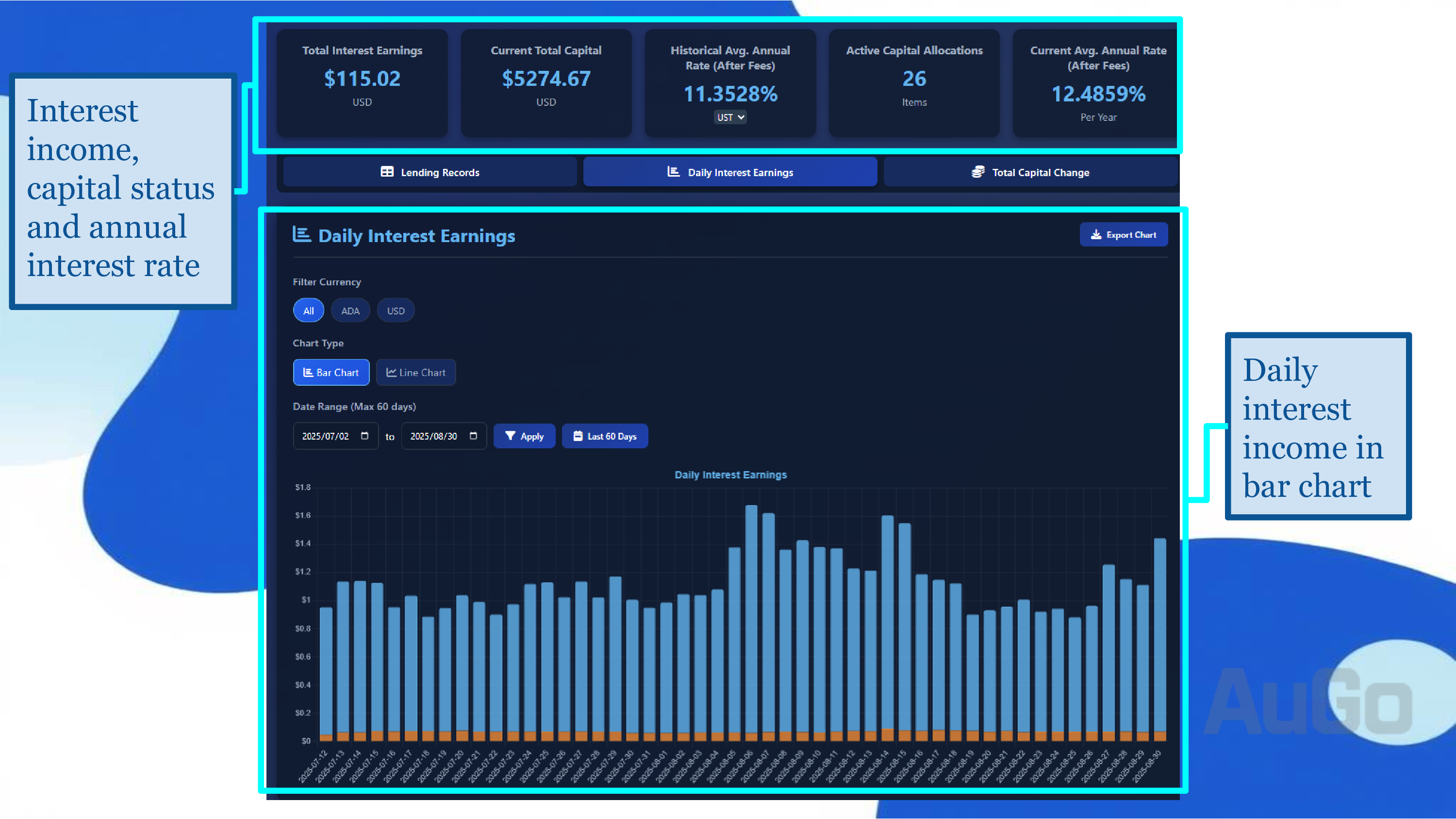
3. View "Historical Earnings Statistics", "Total Capital", and "Average Annual Rate (After Fees)", etc.
Interest Record Features Explained
The interest record page provides a complete breakdown of your earnings. You can:
Date Range Filter
Select a specific date range to view earnings, with support for custom periods and a default of the last 60 days.
Earnings Trend Chart
Visually display earning trends, with support for switching between bar and line charts.
How to Interpret Interest Records
1. Daily Rate Calculation: The daily rate shown has already deducted Bitfinex platform fees, representing the actual rate received.
2. Earnings Settlement: Interest is calculated daily and automatically settled at 01:30 UTC, appearing in the previous day's record.
3. Currency Conversion: Earnings in non-USD currencies will show both the original currency amount and the equivalent USD value.
Use the "Export CSV" function to download complete records for your personal financial reporting.
3View Current Lending Orders
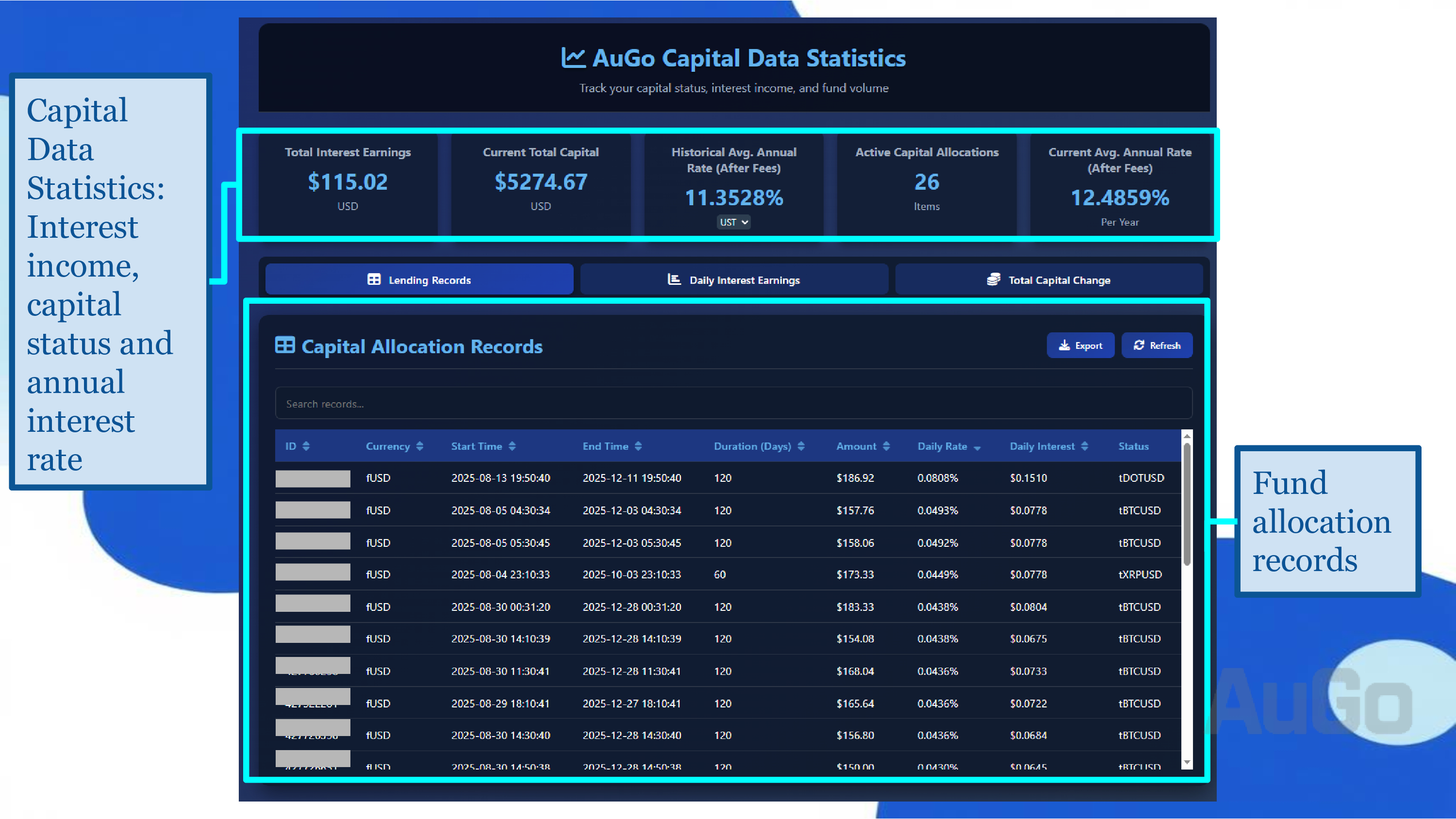
Order Status Explained
The system displays the status of all active lending offers in real-time.
- ID
- Currency Type
- Start Time
- End Time
- Duration (days)
- Amount
- Daily Rate
- Daily Interest
- Status
4. You can manually reclaim loans early (not recommended).
2View Currency Funding Market Data
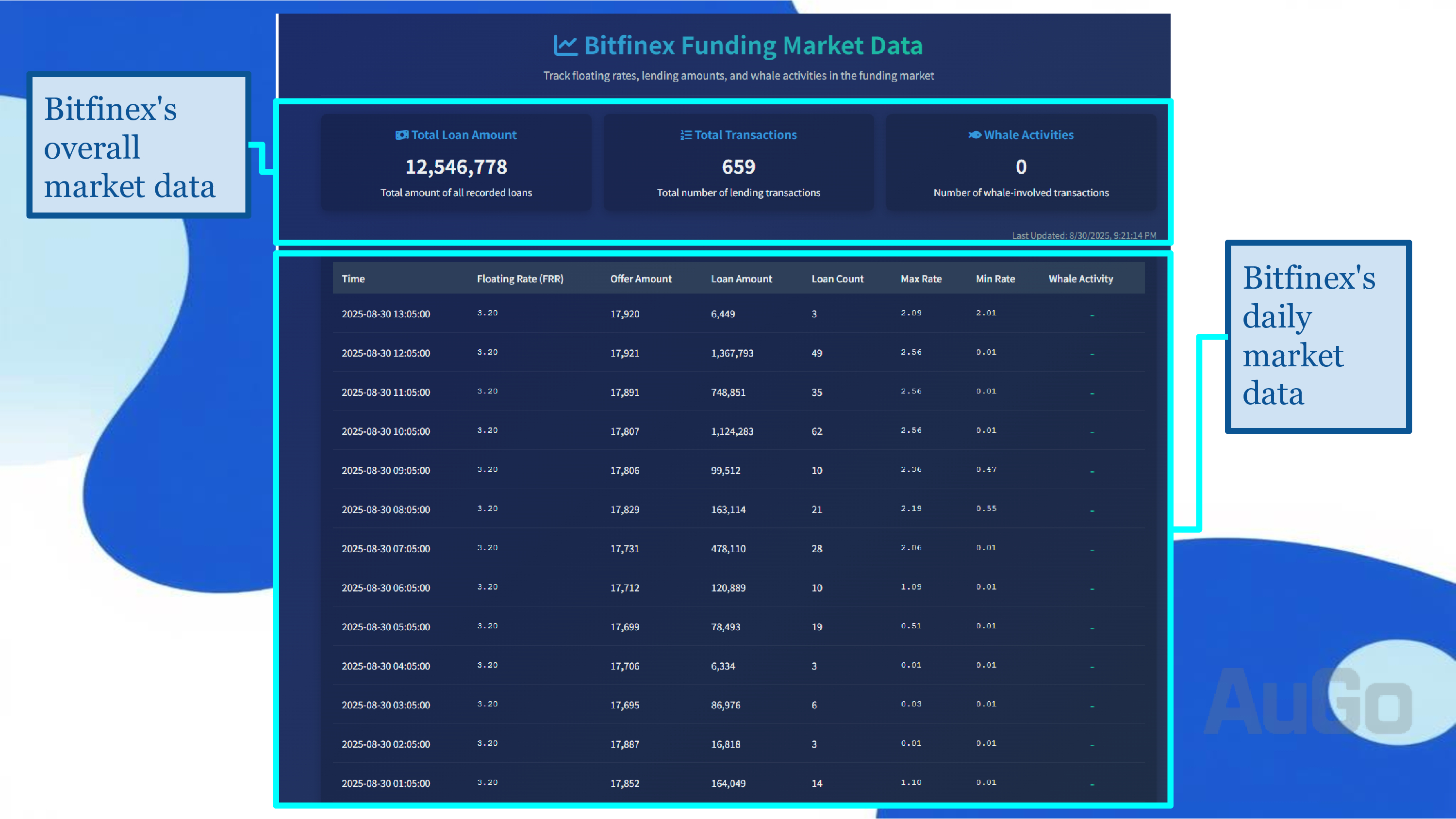
Table Explanation
The system displays cryptocurrency funding status every half hour
- Time (in hours)
- Floating Annual Rate (FRR)
- Supply Currency (in volume)
- Supply Amount (in USD)
- Supply Count
- Highest Annual Rate in Hour
- Lowest Annual Rate in Hour
- Whether there is whale borrowing activity
Common Problem Solving:
Remember: Lending returns fluctuate with market conditions. Low-interest periods are often the norm; patience is key to waiting for high rates.
Ready to Start Your Automated Lending Journey?
Register now to enjoy a 10-day free trial and experience the stable returns of smart lending.